


Upcoming MFA Enforcement
To improve security and better protect your organization, Salesforce is moving towards a stronger baseline by technically enforcing MFA for all users.
Per the Salesforce Trust and Compliance Documentation, all Salesforce customers are contractually required to use MFA in order to access Salesforce products. Beginning in Summer 2026, Salesforce will begin enforcing Multi-Factor Authentication (MFA) for all user logins, including direct UI and Single-Sign On (SSO), across both production and sandbox orgs.
Once the MFA enforcement goes into affect, Salesforce will enable the Require multi-factor authentication (MFA) for all direct UI logins to your Salesforce org setting. Admins will no longer have the ability to disable this setting.
Please note: the Waive Multi-Factor Authentication for Exempt Users permission will also no longer automatically exempt users from MFA. After this change, users with this permission will be prompted to enroll and use an MFA verifier at login.
Moving forward, Salesforce will recognize two levels of MFA based on their authentication strength: Standard MFA and Phishing-Resistant MFA. Certain users, including Admins, will be required to upgrade to Phishing-Resistant MFA. The chart below defines what is considered standard and phishing-resistant.
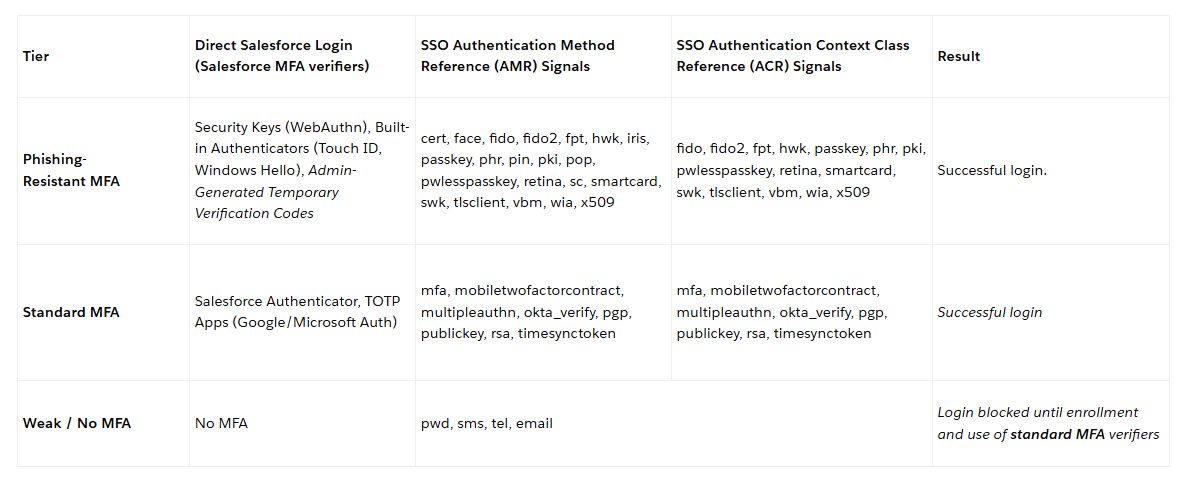
MFA Requirements for Non-Privileged Users
Supported MFA Methods:
Salesforce will allow two levels of MFA methods for non-privileged users:
-
Phishing-Resistant MFA (Recommended): This includes Built-in Authenticators (e.g.,Touch ID, FaceID, Windows Hello) and Security Keys (e.g.,YubiKey from Yubico and the Titan Security Key from Google). Salesforce highly recommends adopting Passwordless login via Passkeys to provide users with the fastest and most secure authentication flow available.
-
Standard MFA: Includes the Salesforce Authenticator mobile app and third-party TOTP Authenticator Apps.
Who's Affected?
-
Any user who does not possess any of these privileges: System Administrator profile, Modify All Data, View All Data, Customize Application, or Author Apex
When Does This Change Take Effect?
- Sandboxes: Starting July 6, 2026, staggered over approximately 7 days.
- Production: Starting July 20, 2026, staggered over approximately 30 days
For more information, please refer to the following Salesforce article: Prepare for MFA Enforcement for All Employee Users
MFA Requirements for Admins and Privileged Users
Supported MFA Methods:
For Admins and Privileged Users, Salesforce will require the following:
-
Phishing-Resistant MFA (Required): This includes Built-in Authenticators (e.g.,Touch ID, FaceID, Windows Hello) and Security Keys (e.g.,YubiKey from Yubico and the Titan Security Key from Google). Salesforce highly recommends adopting Passwordless login via Passkeys to provide users with the fastest and most secure authentication flow available.
Who's Affected?
-
All user who do possess any of these privileges: System Administrator profile, Modify All Data, View All Data, Customize Application, or Author Apex
When Does This Change Take Effect?
- Sandboxes: Starting July 6, 2026, staggered over approximately 7 days
- Production: Starting July 20, 2026, staggered over approximately 30 days
For more information on how to prepare for this upcoming enforcement, please refer to: Prepare for Phishing-Resistant MFA Enforcement for Privileged Users Including Admins
Additional Step-Authentication Requirements on Reports
As part of these advanced security measures, Salesforce will also begin to prompt users to pass an additional step-up authentication challenge when accessing reports if the Step-Up Authentication period has passed since the users' last challenge. The step-up challenge is triggered when a user accesses, runs or views reports and dashboards, rather than waiting for them to click a "Download" or "Export" button. This broader criteria for additional verification helps to mitigate data theft via UI-based screen scraping or browser-based data capture.
Admins will be able to set the Step-Up Authentication period to be from 2 minutes to 120 minutes. This setting will be found in Setup on the Identity Verification page.
Who's Affected?
-
All users (including both Admins and Non-Admins) accessing reports
When Does This Change Take Effect?
-
Enforced in Sandboxes: Starting June 17, 2026, staggered over approximately 7 days
-
Enforced in Production: Starting July 1, 2026, staggered over approximately 30 days
For more information, please refer to the following Salesforce article: Prepare for the upcoming Step-up Authentication requirements on Report Actions
Document: Admin Guide to Multi-Factor Authentication
Our partner, Salesforce, has put together this great Admin guide for MFA, including information about what MFA is, how to implement it, as well as successful adoption tips & other questions.

